Microsoft Teams, Progressive Web APP on Ubuntu
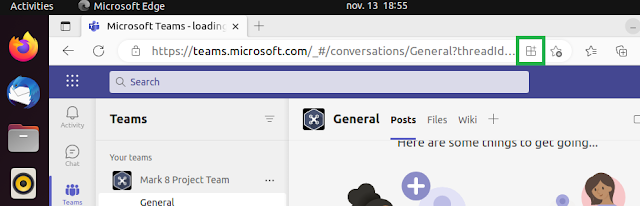
Recently, Microsoft applications are beginning to appear on Ubuntu and with the arrival of Progressiv Web Apps (PWA), this greatly facilitates their porting. The latest application is Microsoft Teams. https://techcommunity.microsoft.com/t5/microsoft-teams-blog/microsoft-teams-progressive-web-app-now-available-on-linux/ba-p/3669846 In this blog post, we will see how to install Microsoft Teams using the PWA. Prerequisites Below is the list of prerequisites Microsoft Edge or Chrome Install Microsoft Teams PWA On your Ubuntu computer, open Microsoft Edge or Chrome Connect to Teams Web site https://teams.microsoft.com Enter your credential informations Click on the icon below Select Install Teams is installed on your computer Uninstall Teams PWA Open Microsoft Edge or Chrome Go to Menu / Apps / Manage Apps Click on the three little dots Select Uninstall Teams PWA - Auto-start on device login Recently, you can activate the automatic launch of Microsoft Teams PWA via Microsoft Edge....